
QODDI DOCUMENTATION
Python
Last updated
Qoddi automatically builds your Python app from your code.
In order to do that, Qoddi uses buildpacks to detect and build your app automatically.
You can fork or build this repository to get started with Python on Qoddi
Please check this tutorial if you are looking to deploy a Streamlit app.
Before Building your code
Commit your Python source, a .python-version file, a Procfile, and the dependency files for one package manager at the repository root.
For pip, use requirements.txt. Current Heroku buildpacks also recognize uv.lock or poetry.lock alongside pyproject.toml. Pipfile.lock is supported by the classic buildpack only. Select the format supported by your Qoddi builder and avoid competing dependency files.
See Python buildpack detection.
Create your app on Qoddi
Create a new app and link it with your repository using SSH keys.
Read this article for a detailed procedure or check this video :
requirements.txt
When using pip, declare your packages in requirements.txt and install them locally with:
python -m pip install -r requirements.txtPin tested package versions, including the production web server, and commit the file. An empty file is enough for pip detection if the app has no packages. Python packages with native components must have compatible wheels or build dependencies available on the builder.
For uv or Poetry, commit the project manifest and lockfile instead; keep runtime dependencies in the production dependency group. Review package-manager build behavior.
Procfile
The Procfile informs the engine of the type of app you are running and prepares the infrastructure accordingly.
On Qoddi, a Procfile always starts by web: regardless of your app type or expected behavior. The exposure of your app to the Internet and other network settings can be updated on your app settings page.
The Procfile basically contains the type of app and the initial script to run when the app starts :
web: python3 server.pyPython Runtime
Place the tested Python minor series in a root-level .python-version file, without a python- prefix. For example:
3.14This allows the builder to select a current patch in that series. Migrate old runtime.txt configurations to this file. Verify the resolved runtime with python --version.
Supported runtimes
| Python | Heroku status on review date | Upstream lifecycle |
|---|---|---|
| 3.15 | Supported | Bug and security fixes; EOL October 2031 |
| 3.14 | Supported; new-app default | Bug and security fixes; EOL October 2030 |
| 3.13 | Supported | Security fixes; EOL October 2029 |
| 3.12 | Supported | Security fixes; EOL October 2028 |
| 3.11 | Deprecated | Security fixes; EOL October 2027 |
Source: Heroku’s Python runtime reference. Specify the version instead of relying on a default; Heroku’s Cedar/Fir default and cache rules are platform-specific.
Runtime references checked November 2, 2026. Available binaries and defaults depend on the selected Qoddi builder and stack; confirm the resolved version in the build log.
End of Life support
Python 3.10 reached upstream end-of-life in October 2026; 3.9 and earlier are also end-of-life. Old installed apps may continue running after build support is removed, but that does not make an obsolete runtime suitable for new deployments. Upgrade and test before rebuilding. See Python’s supported versions.
Support for Pypy (Beta)
The current Heroku Python buildpack runtime list covers CPython. Do not assume PyPy is available through the same version selector. If your app requires a different interpreter, package and maintain it in a Docker image; see Docker deployment.
Ephemeral Disk
Contrary to Marketplace apps that can use Qoddi’s virtual disks features to store and retrieve persistent data, apps that are created from code use an immutable file system.
You can write data locally, for instance, to process files temporarily during your application life, but the data written into your app’s disk is not persistent and gets wiped out after your app restart.
All apps restart at least once every 24 hours, to apply a new setting or to deploy a new build.
To store data and keep it persistent you can use external services like Amazon S3 or Wasabi, an S3 compatible storage service with very affordable pricing.
Add a domain name
Please check this article for a detailed method on how to use your domain name with Qoddi apps.
Define environment variables
Note: Environment variables set in your app settings are injected during the build process. If the build of your app needs to use an env variable make sure to set it before requesting the build.
Qoddi lets you externalize the configuration of your app: the Qoddi cluster will automatically inject the data when the app starts or restart.
Environment variables can include any external data your app needs to run like external resources, databases addresses, encryption keys, etc…
To add an environment variable, access your app settings and click “Add ENV Variable” :
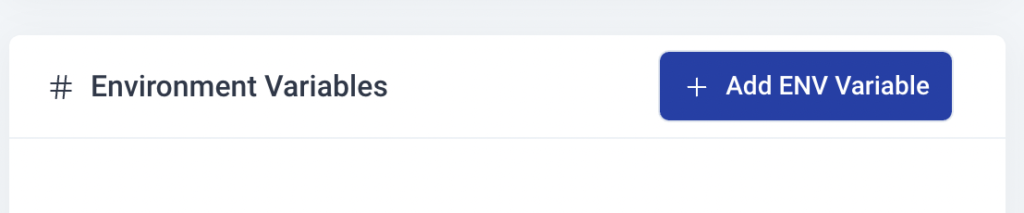
Enter the key (like DATABASE_USER) and the value and click “Add”. Qoddi will automatically add your environment variable and restart your app after a one-minute delay (to let you add more env variables if necessary without restarting the app each time a new variable is added).
Launch a Console Command
Please check this article on how to launch a command directly to your running app. This can be used to perform database migrations, launch local scripts, or perform database backups.
Provision a database
Qoddi Marketplace includes all popular datastore engines including Mysql, Postgres, MongoDB, and Redis.
To add a database to your app, click on Marketplace and select the database you want to run, then create the new app database inside the same stack as your Python app.
Once the app is running, visit the database app’s settings and retrieve the “internal name” :
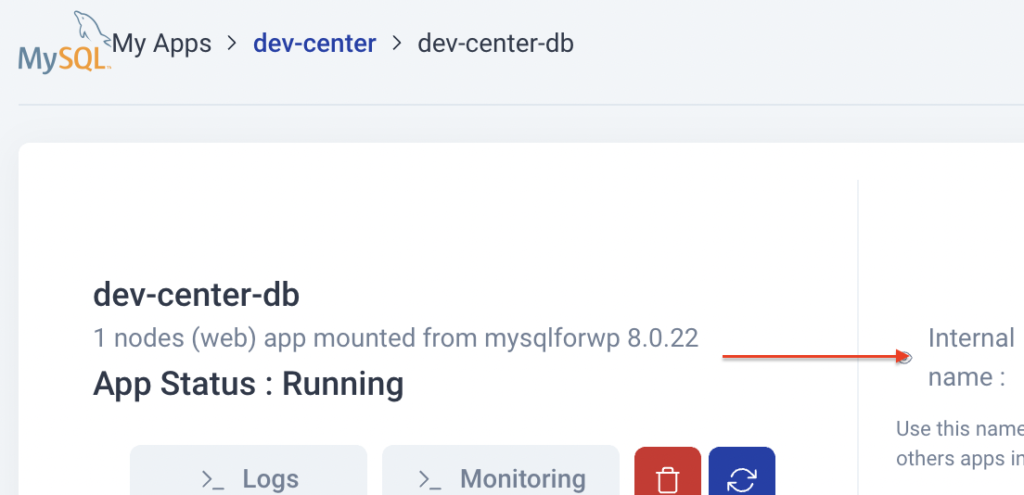
Use this internal name as you would use a server address, for instance for MySQL this name replaces the usual “localhost”. Some scripts require you to add the database port at the end of the server address. Qoddi uses a common port for each database software, for MySQL it will be 3306 and you can write it like that inside your scripts: internal-name:3306
Postgres usually uses credentials sent inside the login URL, like that : postgres://<user>:<password>@<internalname>:5432/<database>
The login and password information is available inside the Environment Variables of the database app.
Reach your app from another app
Inside your app stack, you can reach any other Qoddi app member of this stack on any port. Qoddi automatically routes the traffic internally and opens the appropriate port. By opposition, your app is only reachable on ports 80/443 from outside of Qoddi.
To reach your app internally, retrieve the internal name from your app settings page :
This name can be used to reach your app from another app inside the same stack. Use it in any form that works with your script :
http://<internalname>
<internalname>
http://<internalname>:port
Note: https:// is not available, all the traffic inside apps is already encrypted by the cluster.
Note: Qoddi’s datastores run on a private and encrypted network. Therefore SSL support is deactivated for all datastores available on Qoddi. Ensure that your code doesn’t require using SSL before deploying your app.
Encryption
Qoddi uses at rest encryption for the app virtual disks, build images, and encrypted transport from inside the cluster. To make sure the traffic is encrypted between your app and the browser of your users you can set up SSL certificates for any domain name connected to the app (including Qoddi’s default domain name).
Scale your App
From your app settings you can scale your app vertically and horizontally: by upgrading the app size (refer to our pricing for app sizes details) or by adding more nodes.
Additional nodes will run another copy of your app inside another Qoddi server located inside the same cluster (same geographical location). Traffic is automatically sent to the least occupied node by Qoddi’s load balancer.